Previz the Same Day the Plot Lands: A Big-Show Prep Timeline
On a big TV or music show, the plot drops and a clock starts. Somewhere between that CAD file and a previz-ready console file, days of skilled labor disappear. Here's where they actually go — and what changes when the patch stops being the bottleneck.
This is a case study built on a real number. VLA's author spent twenty-plus years programming award shows and TV specials, and on those shows it used to take three days and three people to get a drafted show channeled and addressed, ready to export to previz. The schedule eventually demanded the same result in an hour, by one person, the same day the plot landed. Understanding where those three days went is the useful part of this article, whatever tools you use — because every one of those sinks is attackable.
Day zero: the plot drops
The LD's plot lands as a Vectorworks file. On a big broadcast rig that's hundreds or thousands of fixtures across trusses, ladders, set pieces, floor packages, and audience surrounds. The drawing is the LD's document — it's drawn to communicate design intent, not to be machine-readable. Symbols may be placeholders, fixture modes are often unstated, and nothing about it knows what a grandMA3 needs. The distance between this file and a console you can program on is the whole story of prep week.
Where the three days traditionally go
1. Extracting the data
First, somebody turns the drawing into rows: every fixture, its position, its type, its accessories. Whether that's exports and cleanup or literally reading the plot and typing, it's careful, boring work where a missed fixture becomes a missed light on air. On the traditional timeline this is a person-day by itself, and it's the foundation everything else stands on.
2. Channeling the rig
Channel numbers aren't arbitrary. A good channel plan follows the geography of the plot — walk the truss, and the numbers walk with you — because the programmer will be typing those numbers under pressure for the rest of the show. Doing this well means sorting fixtures by where they actually hang, blocking out ranges by system and position, and leaving room for the additions everyone knows are coming. Done by hand, it's slow precisely because doing it thoughtlessly costs more later.
3. Addressing DMX
Now every fixture needs a universe and address, which means knowing every fixture's real footprint in its real mode — and those footprints come from fixture profiles that are, in the wild, routinely wrong. Addressing a big rig by hand is bookkeeping across dozens of universes with a spreadsheet's worth of offsets, and every profile question ("is this the 39-channel mode or the 51?") interrupts it.
4. The fixture-type remap tax
Here's the sink people underestimate. The generic route from CAD to console ships the plot's stand-in fixture symbols along for the ride, so what arrives in the console isn't patched with the console's own fixture types — it's patched with fakes that have to be swapped, fixture type by fixture type, for the real MA3 profiles. On top of that, imported and downloaded profiles bring their own breakage, and a big enough library will eventually hit MA3's 1,024-attribute pool limit with no obvious explanation of why things stopped working. This cleanup is console-side, skilled, and slow.
5. Previz, finally
Only when the console file is patched with real types and real addresses does previz become possible — the file exports to the visualization suite and programming can start. On the traditional timeline, that's day three or later. Every day of it is a day the programmer isn't building cues.
The hidden cost: temporary plots are expensive
The worst part isn't the three days — it's what the three days do to everyone's behavior. When patching costs days, a patch is an investment, and nobody wants to make it twice. So the rev-two plot sits unpatched while people wait for "the real one." The LD's what-if rig never gets previzzed, because who's going to burn a team on a maybe. Rehearsal-room rigs get skipped. The cost of the patch quietly decides which versions of the show ever get seen.
The compressed timeline
Now run the same day with the patch compressed to about an hour, one person. The plot drops in the morning. The Vectorworks XML pulls into a patch sheet that understands lighting data. Channels auto-fill by plot position — the geography-following channel plan, computed instead of hand-sorted. DMX auto-addresses across universes in one pass, using real footprints. The LD's symbols get matched to real MA3 fixture types once, and a native patch pushes straight to the console — no fake-fixture remap tax, because nothing fake was ever imported. Addressing writes back to the Vectorworks file so the plot and the console agree. By the afternoon, the file is in previz and the programmer is programming.
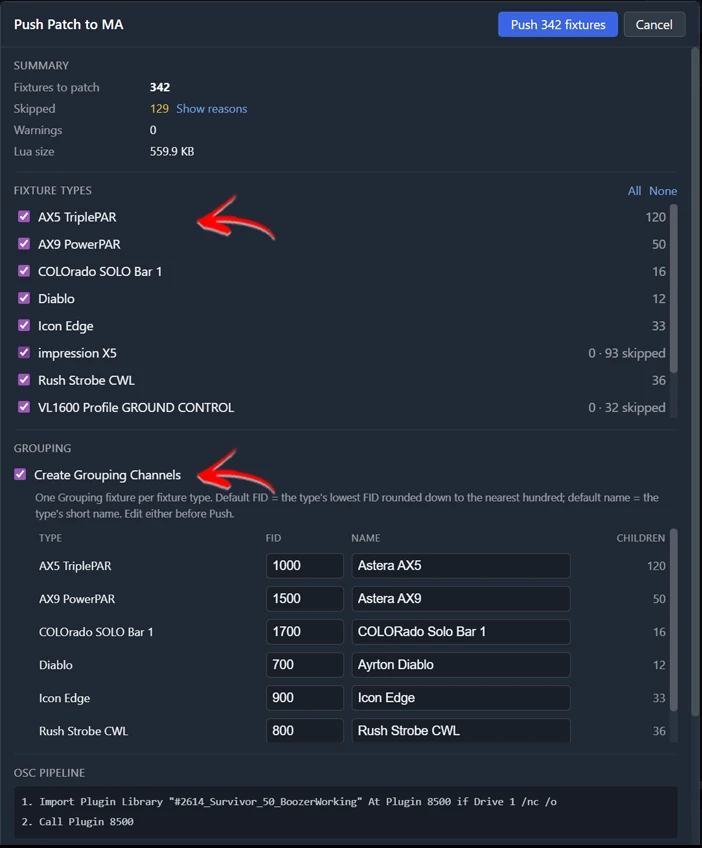
The interesting change isn't the recovered days — it's the economics. When a patch costs an hour, a temporary patch costs you nothing. Rev two of the plot? Patch it. The LD's speculative B-rig? Patch it, previz it, argue about it with evidence. The rehearsal-room subset? Patch it at lunch. Decisions that used to be starved of information get fed, because looking is suddenly cheap. That's the real return: not fewer hours on the same show, but a show that gets to try more versions of itself before it locks.
What to take from this whatever you use
Even without new tools, the map is actionable. Know which of the five sinks eats your prep — on most MA3 shows it's the remap tax and the addressing, not the data extraction. Keep the plot's data machine-readable from the start; every placeholder symbol is a debt that comes due in prep week. Treat fixture profiles as guilty until proven innocent, and audit the library before show week, not during it. And watch for the behavioral tell: if your team avoids patching temporary plots, your patch is too expensive.
Where VLA fits
VLA is the tool built out of exactly this timeline, and its scope is honestly narrow: grandMA3 only (2.3 and 2.4, onPC and consoles), plots in via Vectorworks XML export, native MA3 data out. The Patch Bridge covers steps one through four above — import, auto-channel, auto-address, fixture-type matching, push to console, write-back to CAD — and the Fixture Tools cover the profile breakage and the 1,024-attribute-pool problem that ambush step four. If you're on a different console, the compressed timeline is still worth building toward with whatever gets you there; the economics work regardless of whose logo is on the desk.