Lighting Paperwork Tools in 2026: Lightwright, Vectorworks, Spreadsheets, and Console-Native Bridges
Every big show runs on the same river of data — channels, addresses, positions, fixture types, cue lists — and no single tool owns all of it. Here's an honest map of what each of the established tools is genuinely best at, and where a newer category, the console-native bridge, fits in.
Ask five programmers what they use for paperwork and you'll get five stacks. That's not because anyone is doing it wrong. It's because "lighting paperwork" is really four or five different jobs wearing one name: drafting the plot, maintaining the instrument schedule, tracking work notes and focus, getting the patch into the console, and keeping all of those in agreement as the show changes. The tools below each grew up around one of those jobs, and each is legitimately good at its own.
Plain spreadsheets: the universal fallback
Start with the tool nobody markets. Google Sheets and Excel remain the most-used lighting paperwork software on earth, because they're free-ish, everyone has them, and they'll model anything. Cue lists in particular tend to live here — the stage manager, the director's assistant, and the LD can all edit one shared sheet without buying or learning anything.
The strengths are real: zero onboarding, effortless sharing, total flexibility. The weakness is that a spreadsheet knows nothing about lighting. It won't warn you about a duplicate address, won't understand that a fixture has a footprint, won't talk to your console or your CAD file. Every link between the sheet and the rest of the show is a human retyping things — and that's where errors breed. Spreadsheets are a fine system of record for cue-level and schedule-level information; they're a poor system of record for patch data that has to survive contact with a console.
Lightwright: the paperwork institution
Lightwright has been the default paperwork answer in theatrical lighting for decades, and it earned that. It's known for doing the instrument-schedule job properly: channel hookups, color and gobo tracking, worknotes, dimmer/address management, and reports that look right when they come off the printer — along with data exchange with CAD packages so the schedule and the drafting can stay in sync. Generations of assistants and associate LDs have run entire Broadway seasons on it, and its depth in the day-to-day maintenance of a large theatrical package — the notes, the changes, the paper trail — is the standard other tools get measured against.
If your world is a theatrical production with an assistant maintaining paperwork across weeks of tech, Lightwright is a serious answer, and for many shops the answer. Its center of gravity is the paperwork itself — the documents and the data discipline around them — rather than the console file; the specifics are at lightwright.com.
Vectorworks Spotlight: where the plot is born
Vectorworks Spotlight bills itself as "the industry standard for lighting and stage design software," and for drafting it effectively is. It's a full CAD environment built for entertainment: 2D plots and 3D models in one file, instrument and truss libraries, automated drawing generation, and data-driven worksheets that turn the drawing itself into schedules and inventories. It exports and imports GDTF and MVR for downstream compatibility, offers built-in previsualization through Showcase alongside the free standalone Vision, and supports team workflows through Project Sharing.
For most big shows, Spotlight is upstream of everything else — the plot is drawn here, so this is where the data is born. The catch, from a programmer's chair, is that data born in CAD still has to reach the console, and the generic interchange routes (MVR in particular) can arrive carrying stand-in fixture symbols and geometry the console doesn't want. Spotlight is the right tool for designing and documenting the rig; it was never meant to be the tool that makes your grandMA3 patch console-clean. That gap is exactly what the rest of this article is about.
Moving Light Assistant: the automated-rig specialist
Moving Light Assistant occupies a different niche: deep documentation of automated rigs. It runs on macOS (Intel and Apple Silicon) and 64-bit Windows, and version 1.4 brought a new reporting engine, dark mode, and basic grandMA3 compatibility, with an updated grandMA3 support folder released in late 2024 covering console versions 2.0 and 2.1. Its specialty is the stuff conventional paperwork tools don't model well — documenting what moving lights are actually doing in a show, including preset photo documentation for focus and looks.
If you tour a rep plot or remount productions, and you need to know what every mover was doing in every preset well enough to reproduce it in a different building next year, MLA is built for precisely that job, and nothing else on this list attempts it.
Console-native bridges: the newest category
The newest category exists because of a specific, painful gap: on modern shows, the distance between "the plot is drafted" and "the console is patched and previz-ready" is still measured in days of skilled labor. The data exists in the CAD file. The console needs it. And the road between them — generic interchange formats, fake fixture remapping, hand-typed addressing — is where those days go.
A console-native bridge attacks that road directly. Instead of producing paperwork for humans, it produces data for a specific console, in that console's own formats, with the console's own fixture library as the target. The trade-off is scope: a tool that speaks one console's native language deeply doesn't speak every console's. What you give up in generality you get back in fidelity — the patch that lands is real, not an approximation to be cleaned up at the desk.
Where VLA fits
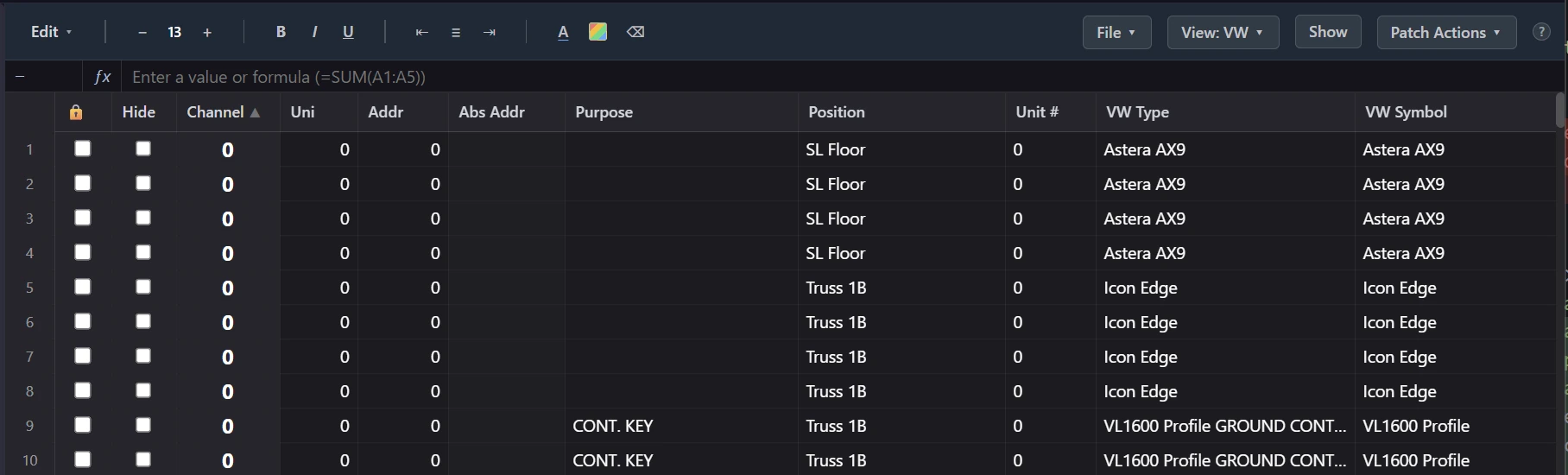
VLA (Virtual Lighting Assistant) is a console-native bridge, and it's honest about the scope that implies: it targets grandMA3 only — versions 2.3 and 2.4, onPC and consoles — and reads plots via Vectorworks XML export. If you program on Eos or an Avolites desk, it isn't for you today. If your show is a theatrical run with an assistant maintaining weeks of worknotes, Lightwright remains the deeper paperwork tool.
What VLA does is the road itself: pull the Vectorworks XML into a patch sheet that understands lighting data, auto-fill channels by plot position, auto-address DMX across universes, match the LD's symbols to real MA3 fixture types, and push a native patch directly to the console — then write addressing back to the Vectorworks file so CAD and console agree. It was built by a working programmer because getting a drafted show channeled, addressed, and previz-ready used to take three days and three people, and the schedule demanded it happen in an hour. It also carries the adjacent jobs that live in the same river of data: cue sheet import from spreadsheets, fixture-profile inspection, and a timecoded media player. The full rundown is on the features page.
The honest summary of the 2026 landscape: Spotlight to draw it, Lightwright to maintain it, MLA to document the movers, spreadsheets to share it with everyone else — and a console-native bridge when the thing you actually need is the patch, on the console, today.