Vectorworks to grandMA3: Patching a Plot Without the MVR Tax
The plot lands, the schedule says previz starts tomorrow, and somebody has to turn a Vectorworks drawing into a grandMA3 patch. Here’s what actually has to travel between the two worlds, why the obvious route costs more than it looks, and how to keep the trip short.
What actually has to travel
Strip away the file formats and the job is small: for every fixture on the plot, the console needs a fixture type and mode, a fixture ID, a universe and address, and ideally a name that means something. The paperwork side needs a little more — position, unit number, channel, purpose, color — but it’s all the same rows. The drawing is a picture; the patch is a table. Everything between Vectorworks and grandMA3 is really just an argument about how that table gets built and who owns each column.
That framing matters because it tells you what you don’t need to move: geometry. The console’s 3D stage is useful, but the patch itself is data, and data has cheaper vehicles than a full scene export.
Why the MVR route hurts
MVR is the industry’s scene-transfer container: it bundles the drawing’s geometry together with fixture definitions and hands the whole thing to the console at once. For dropping a stage into a visualizer, that’s exactly what you want. As a patching workflow, it front-loads a problem you then spend the rest of prep paying off.
The core issue is fixture types. The definitions that ride along with an exported scene are whatever the drawing package had on hand — and fixture profiles from outside the console’s own ecosystem are routinely broken or subtly wrong: attribute layouts that don’t match how you program, modes that don’t line up with what’s actually in the rig, duplicates of types you already maintain in your showfile. So the real-world loop becomes: import the scene, discover the imported types aren’t the ones you want to program on, and remap fixture by fixture onto the profiles you trust. On a 60-fixture club show that’s an annoyance. On a 2,000-fixture television rig it’s a day of work that produces nothing the audience will ever see — and it repeats every time the plot revs and you re-import.
None of this means MVR is bad at its actual job. If you need the set and trims in a visualizer, export one. Just don’t make it the vehicle for your patch data, because the patch is the part it handles worst.
What the Vectorworks XML actually carries
Vectorworks Spotlight has quietly shipped a better vehicle for years: the Lightwright data-exchange file. Under Spotlight Settings → Spotlight Preferences, the Lightwright tab has an Automatic Data Exchange option — turn it on, add the fields you care about, enable a full export, and Vectorworks writes an XML file next to the drawing and keeps it updated as the plot changes.
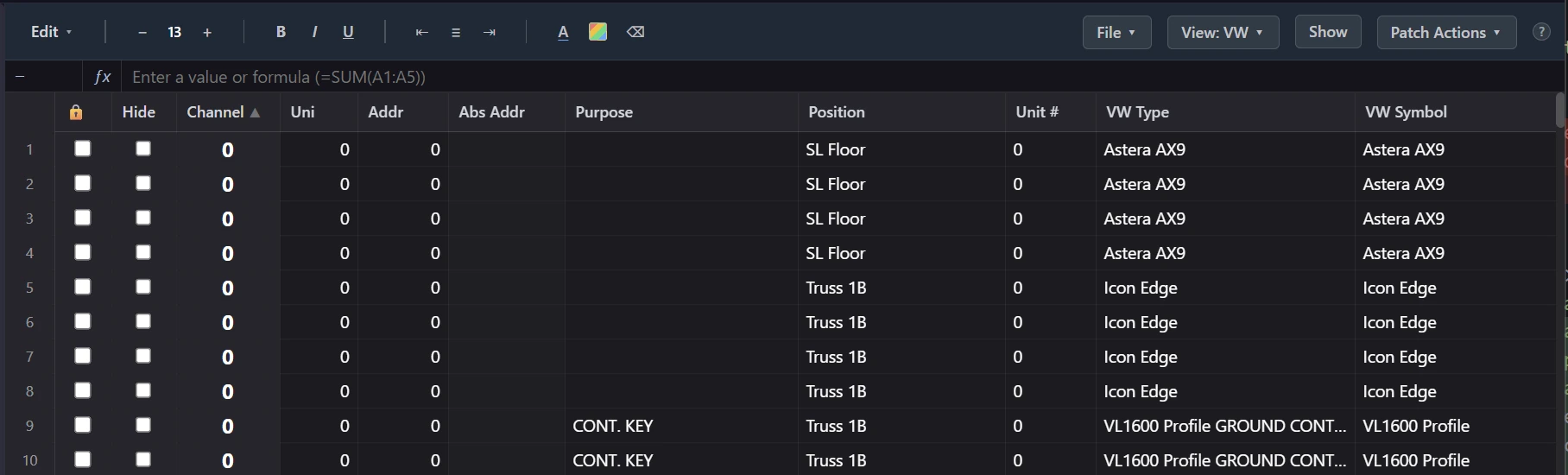
That file is pure per-fixture data: the instrument type, position, unit number, channel, address, purpose, color — whichever fields you chose to exchange. No geometry, no bundled fixture definitions, no container format. It was built so Lightwright could stay in step with the drawing, and it works two ways: Vectorworks refreshes the file when it regains focus, and it will also read changes back in, so channel and address data written into the file by an external tool shows up on the drawing itself. That round trip is the piece most programmers don’t know exists — the plot can receive your patch, not just emit it.
The manual path, done honestly
If your toolchain is a spreadsheet and a console, the XML (or a worksheet export from Vectorworks) is still the right starting point. A workable manual pass looks like this:
- Get the data out flat. One row per fixture, with type, position, and whatever the LD has already decided. Resist the urge to work from the drawing directly — you’ll miss fixtures hidden behind other fixtures.
- Decide fixture types against the console, not the drawing. The names on the plot are the LD’s shorthand; the profiles in your showfile are what you’ll actually program. Build the mapping once — this VW symbol means this MA3 fixture type in this mode — and write it down, because the plot will rev and you’ll need it again.
- Channel and address in the spreadsheet, not at the desk. Sort by position, assign channels in position-sized blocks, walk DMX across universes with each fixture’s footprint in hand. It’s far easier to see collisions in a sorted sheet than in a console patch window. (There’s a whole discipline to this on big rigs — see the channel-numbering guide.)
- Enter the patch on the console last, from the finished sheet, and treat that entry as transcription — no decisions at the desk. Decisions made while typing into a patch window are the ones nobody wrote down.
- Close the loop back to the drawing. Get channels and addresses back onto the plot — via the data exchange, or by handing the sheet to whoever maintains the drawing — so the paperwork everyone else prints agrees with the console.
Done carefully, this works. It’s also the process that historically took a few people a few days on a big show, with the transcription step as the main error source and the re-sync step as the first casualty when the schedule compresses.
When the plot changes — and it will
The first import is never the last. The LD adds a truss, cuts a ballyhoo, moves twelve fixtures to a new position. Whatever workflow you pick, judge it on the second import, not the first: can it tell you what changed, apply updates to fixtures you’ve already patched without stomping your work, and get your side’s changes back onto the drawing? A one-shot import that has to be redone from scratch on every rev quietly turns “the plot changed” into a half-day event — which is exactly the pressure that makes teams stop syncing and lets the drawing and the console drift apart for the rest of the run.
Where VLA fits
VLA’s Patch Bridge is this exact workflow with the manual steps compressed. It reads the Vectorworks data-exchange XML straight into a patch sheet built for lighting data, auto-matches VW instrument types to the real MA3 fixture types in your connected showfile (you confirm or fix the mapping in one view), and auto-fills channels, DMX addresses, and unit numbers from the plot’s own positions. Push to MA then sends a native grandMA3 patch — real fixture types, real MA3 data, previewed before anything touches the console — and Push to VW writes channels and addresses back into the XML so the drawing updates the next time Vectorworks has focus. The revision loop is one click in each direction: pull when the LD touches the drawing, push when you touch the patch. No MVR, no remap tax, and the second import costs about as much as the first — which is to say, minutes.