Channel Numbering for Big Rigs: 2,000 Fixtures the Plot Can Explain
On a big rig, channel numbers are the language the whole team speaks under pressure. A good system means anyone can hear “862” on comms and know roughly what it is and where it hangs — before they look anything up.
Channels are a language, not IDs
A patch where channels are just unique integers technically works. Then tech starts, and the difference between a numbered rig and a systematized one shows up every thirty seconds. When the LD asks for “the wash on the mid truss, third from stage left,” a good system lets the programmer type a number without hunting. When a mover faults, the tech hears one channel number and already knows which truss to climb. The number itself carries information: what kind of fixture, which position, roughly where on it.
That only happens if the numbering is derived from the plot — from where fixtures actually hang — instead of from import order, drafting order, or whatever sequence the fixtures happened to arrive in. Here is a system that scales to a couple thousand fixtures and survives contact with revisions.
Step 1: Rank the positions
Everything downstream walks the rig position by position, so the first decision is the order of the walk. Two conventions work; pick one and commit:
- By importance — the key positions get the low, memorable blocks; specials next; fill last. This is the show-programming convention: the numbers you type most are the shortest and the easiest to remember.
- By geography — positions run upstage→downstage (or the reverse) in numerical order, so channel blocks march across the plot in a predictable direction. This is the touring/tech-friendly convention: given a channel, you can point at the truss.
While you’re at it, settle orientation. Every direction word in the system — which end of a truss is “first,” what SR/SL means for numbering direction — depends on knowing which way is upstage in this drawing, and LDs draft with the stage at the top, side, or bottom as the page demands. Decide it once, against the LD’s intent, before numbering anything.
Step 2: Block channels by category and position
With the walk order fixed, carve the channel space twice:
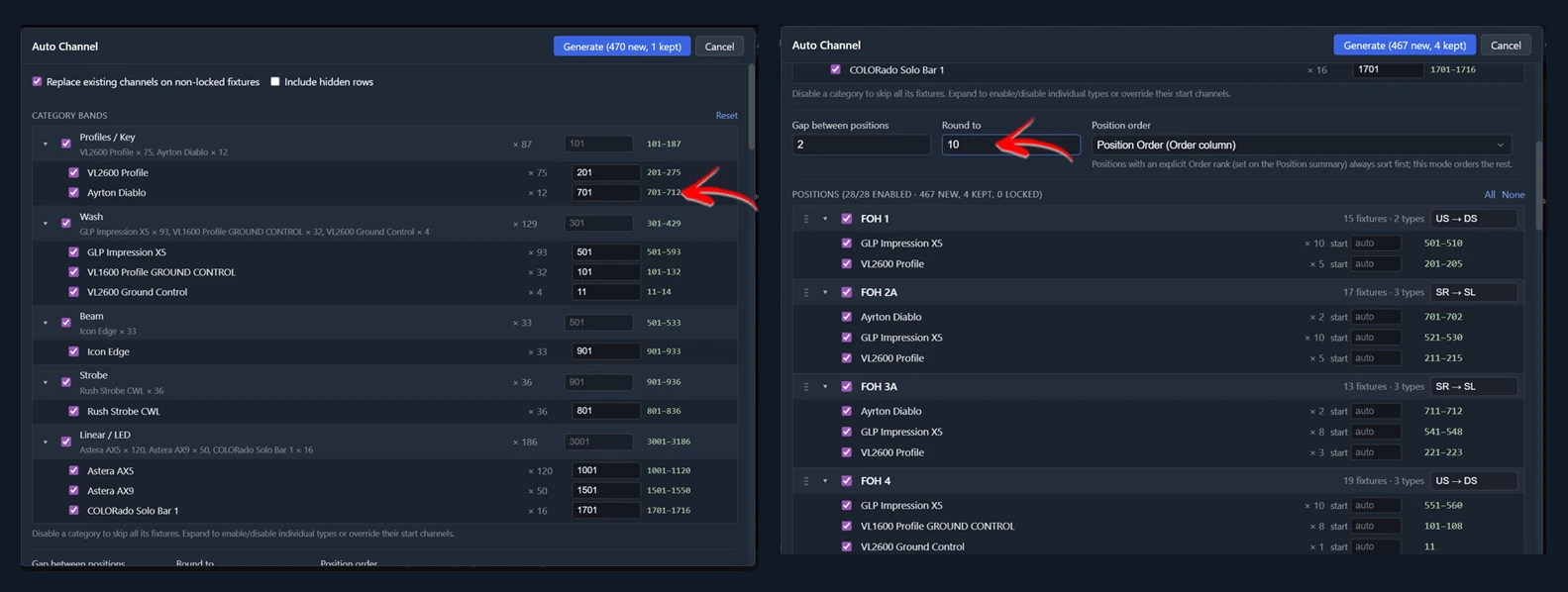
First by fixture category. Give each family of fixture its own range — profiles in one band, washes in another, beams, strobes, linear/LED product each in their own. Now the leading digits of a channel tell you what kind of light it is: hear a 500-series number, know it’s a wash. Leave each band far more headroom than the plot currently needs; the plot will grow.
Then by position within each band. Walking positions in your chosen order, each position’s fixtures of that category get a contiguous block. Two rules make the blocks durable:
- Round the block starts to clean numbers — 10s for small positions, 100s for big ones. “Mid truss washes start at 520” is memorable; “starts at 517” is not.
- Leave gaps between positions. The empty channels between blocks are what let the LD add four fixtures to a truss in week two without renumbering the rest of the rig. Gaps are not waste; gaps are the system’s shock absorbers.
Within a block, number in a consistent physical direction — the same direction on every truss. That’s what makes “third from stage left” computable in your head.
When you’re done, audit it in two sorts: a channel-ordered list (gaps and duplicates jump out), and a type-by-position grid showing the channel range at each intersection. If that one-page grid reads cleanly — ranges stepping across positions in order, bands separating categories — the system works. If you can’t explain the grid to an associate in two minutes, neither will the numbers explain themselves at 2 AM.
Step 3: Address DMX in the same walk
Addressing is the same problem with a harder constraint: every fixture type has a footprint, and footprints must not collide within a universe. Do it in one deliberate pass, not incrementally:
- Walk the same position order you channeled in, so address blocks and channel blocks correspond — a fault report with either number points at the same truss.
- Pick a layout that matches the cabling. Per-position universe blocks (each position starts a fresh universe or a rounded boundary) cost universes but make every truss self-contained — a data run to a truss carries that truss’s universe, full stop. Daisy-chaining positions packs tighter when universe count is the constraint.
- Round starting addresses to clean boundaries for the same reason you round channel blocks: humans read these numbers off scrolling displays on a ladder.
- Audit in address order. Sort the finished patch by universe and address; overlaps and gaps are visible in seconds in a way no amount of staring at the plot will show you.
Doing this by hand for 2,000 fixtures means carrying every type’s footprint in a lookup while you walk — which is exactly why hand-addressed big rigs are usually addressed by three people over a long day, and why the universe map ends up with archaeological layers from every rev.
Step 4: Unit numbers that follow the plot
Unit numbers are the third numbering system, and the one for the crew: each fixture’s number describes which unit it is on its position, restarting at 1 on every position. They exist for paperwork and for talking about the rig — “box boom SL, unit 4” — not to drive channels or addresses; keep the systems independent so a channel change never forces a relabel.
The craft points: number in one consistent direction rig-wide, and decide up front how you’ll handle fixtures hung at slightly different heights on the same pipe — you need a tolerance for what counts as “the same row,” or a double-hung truss turns into a numbering argument. And units must follow the plot’s geometry, not the spreadsheet’s sort order; a unit number that disagrees with physical left-to-right is worse than none.
The real test: the plot changes
Every part of this system is cheap on day one and pays off on day ten, when the rev lands. Category bands with headroom and inter-position gaps absorb added fixtures without renumbering; corresponding channel and address blocks mean one mental map, not three; regenerated sorts and grids re-audit the whole rig in minutes. The systems that fail are the ones where renumbering costs so much that everyone patches around the system instead — three revs later the numbers explain nothing, and you’re back to looking everything up.
Where VLA fits
This entire system is what VLA’s auto-fillers execute as one pass each. Rank positions once in the Positions view; set the plot’s orientation once so SR/SL/US/DS resolve the way the LD drew it. Auto Channel takes category bands, position gaps, and rounding as dialog settings and walks the rig; Auto DMX walks the same order with every fixture’s real footprint, with layout choice, seed universe, rounding, and per-position direction overrides; Generate Unit Numbers fills the whole show with direction and same-row tolerance handled. The Channel Sheet, Address Sheet, and Channel Summary views are the audits described above, live. Because a full re-run costs seconds, the day-ten rev is genuinely free: re-pull the plot, re-run, re-check the grid — then push the patch to MA3 and write the numbers back to the Vectorworks drawing so plot, paperwork, and console all speak the same language.