grandMA3 Patch Sheets: Getting Paperwork In and Out of the Console
The console holds the truth about the patch; everyone else on the crew works from paper. This guide is about the gap between those two facts — what patch paperwork a show actually needs, how to build it without retyping, and how to keep it from drifting away from the desk.
The paperwork a patch actually generates
A patch isn’t one document. The same set of rows gets asked for in half a dozen shapes, by half a dozen people, and each shape answers a different question:
- The full patch / hookup — every fixture with type, mode, position, unit, channel, universe and address. The master record. Nobody reads it end to end; everybody needs it to exist.
- The channel hookup — the same rows sorted by channel. This is the programmer’s view: it’s where gaps, duplicates, and numbering that stopped making sense show up first.
- The address sheet — sorted by universe and address. The tech’s view, and the fastest place to spot two fixtures claiming the same DMX real estate.
- The DMX summary — a rollup per fixture type: how many, in which mode, how many DMX channels each and in total. This is what sizes your universes during prep and catches a mode choice that quietly doubled a type’s footprint.
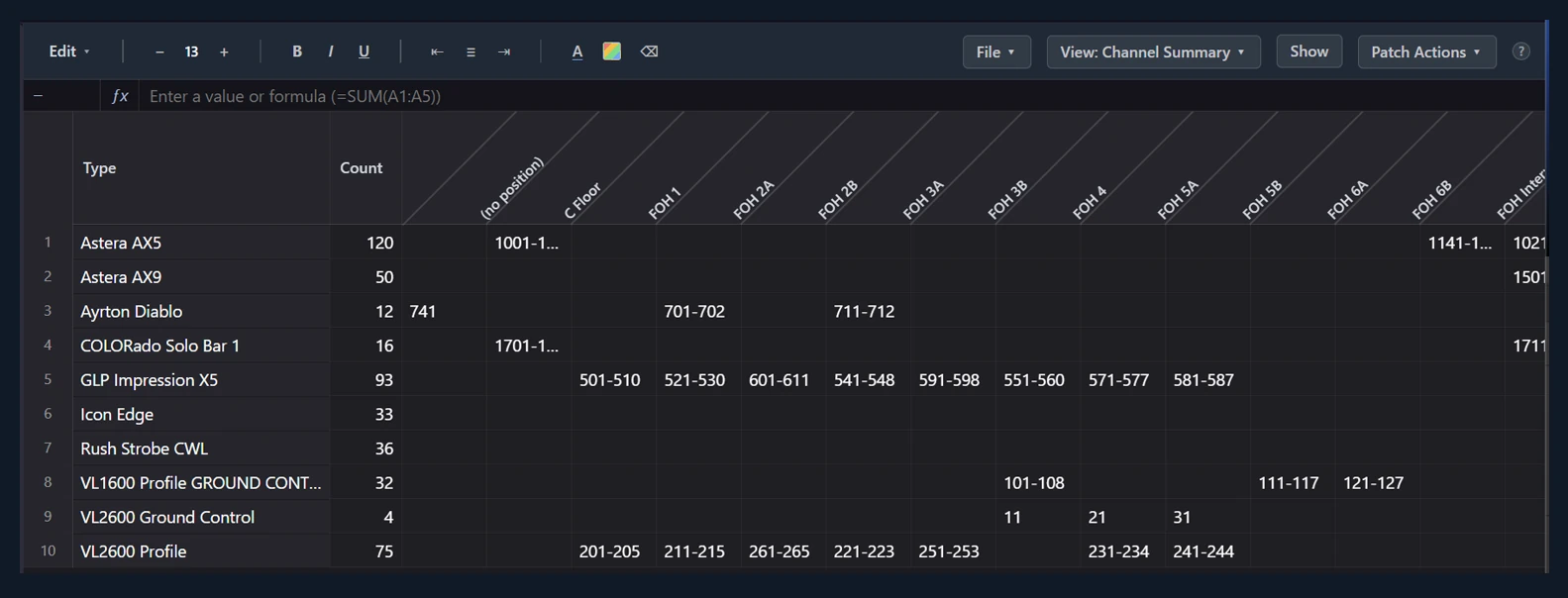
- The channel summary — fixture types against positions, with the channel range at each intersection. One page that shows how channels are distributed across the rig; the fastest way to explain the numbering system to a designer or an associate.
- Fixture totals — the same type-by-position grid with counts instead of ranges. Prep uses it as a packing list per truss; the LD uses it to talk through coverage.
Notice that only the first one is really “data.” The rest are sorts and pivots of it. That’s the key insight for keeping paperwork sane: maintain one table, generate every view.
Building it by hand: the spreadsheet discipline
The traditional toolchain is a spreadsheet (or Lightwright, which is a spreadsheet that understands lighting). It works, if you hold three disciplines:
- One canonical table. Every derived document — channel hookup, address sheet, summaries — is a sort, filter, or pivot of the master. The moment someone maintains the channel hookup as its own file, you have two sources of truth, and one of them is now wrong.
- Column ownership. Decide who is allowed to change what. The LD owns positions and purposes; the programmer owns channels and fixture types; the tech may own circuiting. A patch sheet where anyone edits anything becomes a patch sheet nobody trusts.
- A dated version on every printout. The failure mode of paper isn’t that it’s wrong — it’s that it’s was right. When the desk and the paper disagree, the first question is always which rev the paper came from.
The honest cost of this system isn’t building it — it’s the transcription at both ends. The plot data has to get typed into the sheet, the finished patch has to get typed into the console, and every console-side change made during tech has to find its way back out to the sheet by hand. Each of those handoffs is a place where a digit flips.
Getting paperwork out of the console
The other direction matters just as much. Plenty of shows start at the desk: a patch built on the console during prep, or a showfile you inherit from another programmer, with no paperwork behind it at all. The console’s own patch screens are the authoritative record, but they’re a live editing surface, not a document — you can’t hand them to a crew chief, pivot them by position, or diff them against last week.
The manual answer is to transcribe: walk the console patch and rebuild the table outside, then keep it current by hand. That’s exactly as tedious and error-prone as it sounds, which is why inherited showfiles so often live their whole run with no paperwork — and why the electrician ends up reading addresses to someone over the radio during a fault.
Whatever tooling you use, the principle to hold is direction of trust per column. After tech starts, the console is the truth for channels, addresses, and fixture types — anything outside should be refreshed from it, never the reverse, unless you’ve deliberately made an edit outside and are pushing it in. Sheets that get edited in both places without a rule are how a rig ends up with two fixtures both claiming channel 341.
Keeping console and paperwork in sync
Sync fails in a predictable pattern: it survives prep, wobbles through tech, and dies the first long night. So build for the long night:
- Make the update cheap. If refreshing the paperwork from the console takes an hour, it happens weekly. If it takes a minute, it happens whenever someone asks “is this current?”
- Batch console-side changes. A pile of sticky notes on the monitor bridge that gets reconciled once a day beats real-time edits nobody logs.
- Regenerate, never patch, the derived documents. If the channel hookup is a sort of the master, reprinting it is free and it can’t drift on its own.
Where VLA fits
VLA’s patch sheet is the one-canonical-table model with the transcription removed. Six views of the same rows — full patch through channel and DMX summaries — so the channel hookup, address sheet, DMX summary, channel-summary pivot, and fixture totals are all live sorts of one dataset, never separate documents. Import Patch from MA pulls the full fixture patch out of a connected console into a sheet — the inherited-showfile problem solved in one action — and Push to MA sends your sheet back as a native grandMA3 patch, with a preview of exactly what will be sent before anything touches the desk. The same rows also ride the Vectorworks bridge, so channels and addresses land back on the plot without a retype. One table, every view, both directions.