Programming a grandMA3 Timecode Show From the Rehearsal Room
Desk time is the scarcest resource on a timecode show. Most of what goes into a timecode list — where the hits are, which musical figure cycles, what fires on the downbeat of the bridge — can be decided anywhere you can hear the track. Here's how to do that work away from the rig, and what actually has to happen at the console.
What a grandMA3 timecode event really is
Under the hood, an MA3 timecode list is a set of events, each stored at an absolute timecode value and pointed at a cue. In the show file's timecode XML, an event reads literally: a CmdEvent with Time="1h00m00.060" means hour 1, minute 0, second 0.060 — no offset, no relative interpretation. The list's start hour is simply where its first event lives.
One aside worth knowing because it confuses people: the timecode pool element carries an OffsetTCSlot attribute. It is output-latency compensation — a playback-time shift so a downstream device with processing delay lands on the true position — not part of where your events "are." In a survey of 127 real show exports it was set in exactly one, and that one was an empty list. Event times are just event times; treat the offset as a separate knob you'll probably never touch.
That absoluteness is why the hour convention matters so much: on multi-song shows each segment typically gets its own timecode hour, and every event you build inherits that hour forever. If you program song four's events at hour 1 because that's how your rehearsal file happened to be striped, they will need to move before they mean anything against the real hour-4 stripe.
The console-only way, honestly
The traditional workflow is entirely at the desk. You build your cues first, then roll the striped audio into the console and attach cue triggers to the running clock — either capturing them live as you press Go in time with the music, or typing times into the timecode editor by hand. Then you roll it again and nudge. And again.
This works, and every timecode programmer has shipped shows this way. Its honest costs:
- It consumes the rig. Every pass through the song is a pass nobody else can use the desk for, and it can't start until the rig exists.
- Iteration is slow. The edit loop is roll → listen → stop → find the event → retype the time → roll again. Fixing twenty events that are each a few frames late is an afternoon.
- You can't see the music. The console shows you a list of times; it doesn't show a waveform, so "the hit is at the fourth snare" becomes a number you found by scrubbing.
- Artist revisions hurt. When a new mix arrives with the arrangement changed, there's no side-by-side — you re-verify every event against the new track by ear.
Doing the work before you have a desk
Even with no tools beyond a laptop and the striped audio, you can move most of the thinking off the console:
- Get the audio early and pin down the hour map. Which segment lives at which hour, where each 00 mark falls, how much preroll runs ahead of it. Every event you plan hangs off this.
- Mark the structure, not just the hits. Intro, verses, the button at the end — a bar-and-beat map of the song is worth more than a list of raw times, because when the arrangement changes the structure survives even when the times don't.
- Decide the cycling figures in advance. A lot of musical programming is a small stack of cues cycling on a pulse — a four-cue button that goes 1, 2, 3, 4, 1, 2, 3, 4 through the chorus. Which figures cycle, at what beat multiple, is a musical decision you can make in headphones.
- Keep the event list as data, off the console. A sheet of cue number, label, and time per event survives console swaps and gives you something to diff when the times move.
Then the desk session becomes transcription plus polish instead of composition — which is the right way around, because polish is the only part that genuinely needs the rig and the lights.
Stamping against real audio
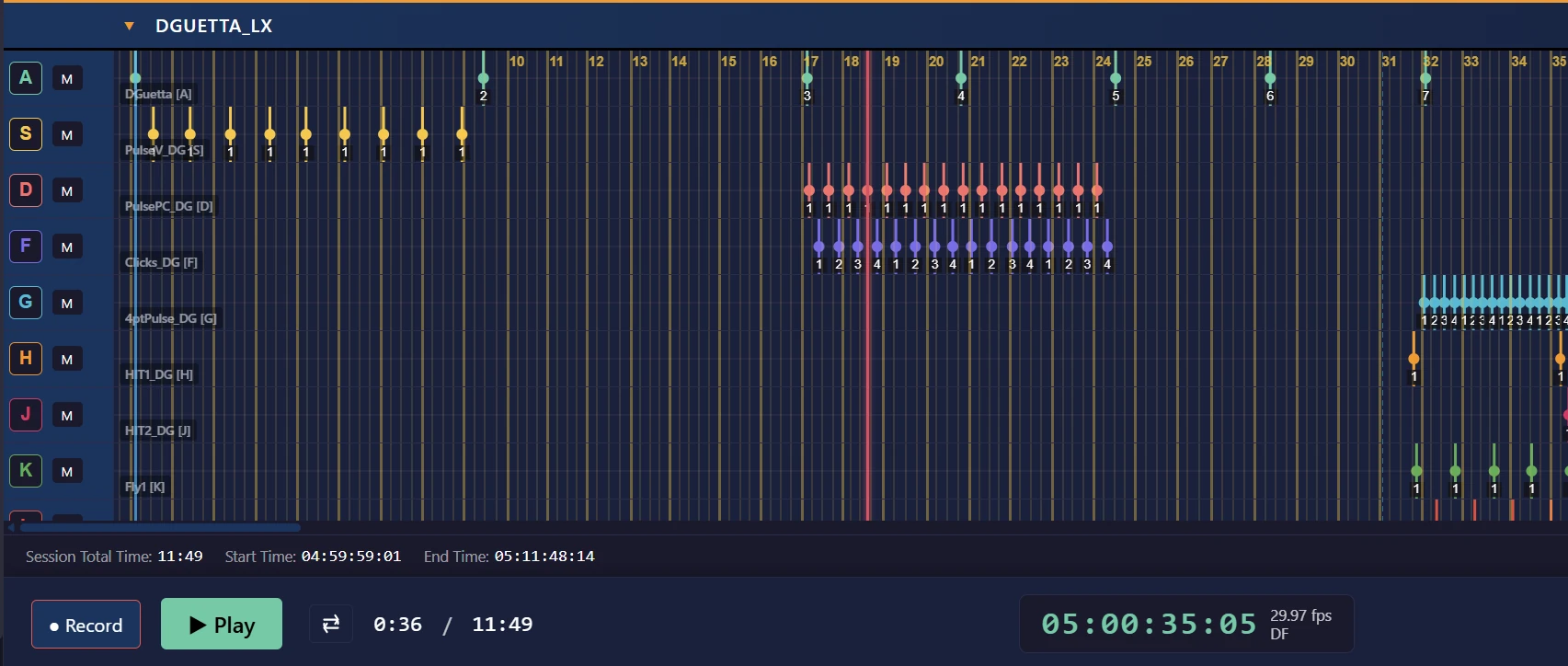
The step that transforms the workflow is stamping events while the actual track plays, the way a drummer would play them, instead of computing times one at a time. Roll the song, tap on the hits, and accept that the first pass is rough — then clean up timing afterward against a visible beat grid rather than hunting each event by scrubbing. Rough-then-refine beats precise-but-glacial every time, and it's only possible when your event surface shows the waveform and the events together.
Where VLA fits
This stamping workflow is what VLA's Media Player record mode is. Load the striped audio; VLA finds the timecode and anchors the session's 00 mark. Create event layers typed to how MA sequences cycle — Seq for one new cue per event, 1x/2x/4x/8x for cycling musical buttons, Temp for scratch ideas that never export. Arm Record, play the track, and each layer's trigger key (A, S, …) stamps an event at the playhead. Afterward, drag-select and nudge events on the canvas — they soft-snap to a detected beat grid — or edit cue numbers, labels, TC, and fades in a spreadsheet-style cuelist pane. Push sends each layer to the desk as one MA sequence; existing sequences on the console are left alone, and unassigned layers auto-number from 8001 so a careless push can't land on real cues. Pull works too: bring an existing MA timecode list into the session, re-align its hour to the current media, edit, and push it back — with cue numbers preserved through the round trip, so cue 16 stays cue 16.