SMPTE Timecode for Lighting: A Rehearsal-Room Guide
A timecode show is mostly won or lost before the desk ever chases a frame. This is the working version of what timecode actually is to a lighting programmer, how rehearsal rooms really run it, and how to get useful programming done against real audio when the show rig is in a truck somewhere.
What the console actually needs from you
Strip away the mystique and a timecode show is simple: the desk listens to a running clock, and every event you programmed fires when the clock reaches its stored time. The desk doesn't know about downbeats or choruses. It knows hour:minute:second:frame, and it fires on the rolling number it hears right now.
On most music and broadcast shows that clock arrives as LTC — timecode carried as an audio signal, usually baked into one channel of the show audio file. Whoever built the track put program audio on some channels and the timecode stripe on another. Your job is to get the TC channel to the console's input, keep the program audio out of it, and program events against the same clock the desk will hear on show day.
Two properties of that signal matter to you operationally:
- The frame rate it was striped at. A file might read, say, 29.97 fps drop-frame. You don't need to re-derive the math behind drop-frame in the rehearsal room — you need to know what your file is, and make sure everything reading it agrees. When a display shows a rate you didn't expect, that's the first thing to chase.
- The hour it starts at. Which brings us to the hour map.
The hour map: one segment, one hour
A common convention on timecoded shows is to give each song or segment its own timecode hour. Song one lives at hour 1, song four at hour 4, and so on. The music itself starts at the top of the hour — call it the 00 mark — with a few seconds of preroll timecode running in front of it so the desk locks before the first note. If a track's 00 mark sits at 04:00:00:00 with three or four seconds of preroll ahead of it, that segment's start hour is 4.
The hour map is a contract between departments. When audio delivers a new mix of song four, it should still start at hour 4, and your events should still land. When that contract breaks — a rev shows up striped at a different hour than the one you programmed against — every event in that segment is now an hour off, and somebody spends an evening re-aligning. Agree the hour map early, write it down, and check every delivered file against it.
How rehearsal rooms actually run timecode
Here is the part nobody's manual covers. In a real production rehearsal, the same audio file has to serve people with incompatible needs:
- The desk needs the TC channel, clean.
- Some of the team wants TC audible in their ears so they can hear where they are.
- Some of the team cannot work with that tone in their ears at all.
- Some want plain stereo program audio and nothing else.
The traditional fix is to keep multiple versions of the same file — TC on its own channel, TC left / audio right, no TC at all — and hand the right one to the right person. In practice that means three versions of every song, times every revision the artist sends, and within a week nobody is certain which file is current. On top of that, none of those files show you the console's events; the audio file and the cue stack live in two different worlds and you reconcile them by ear.
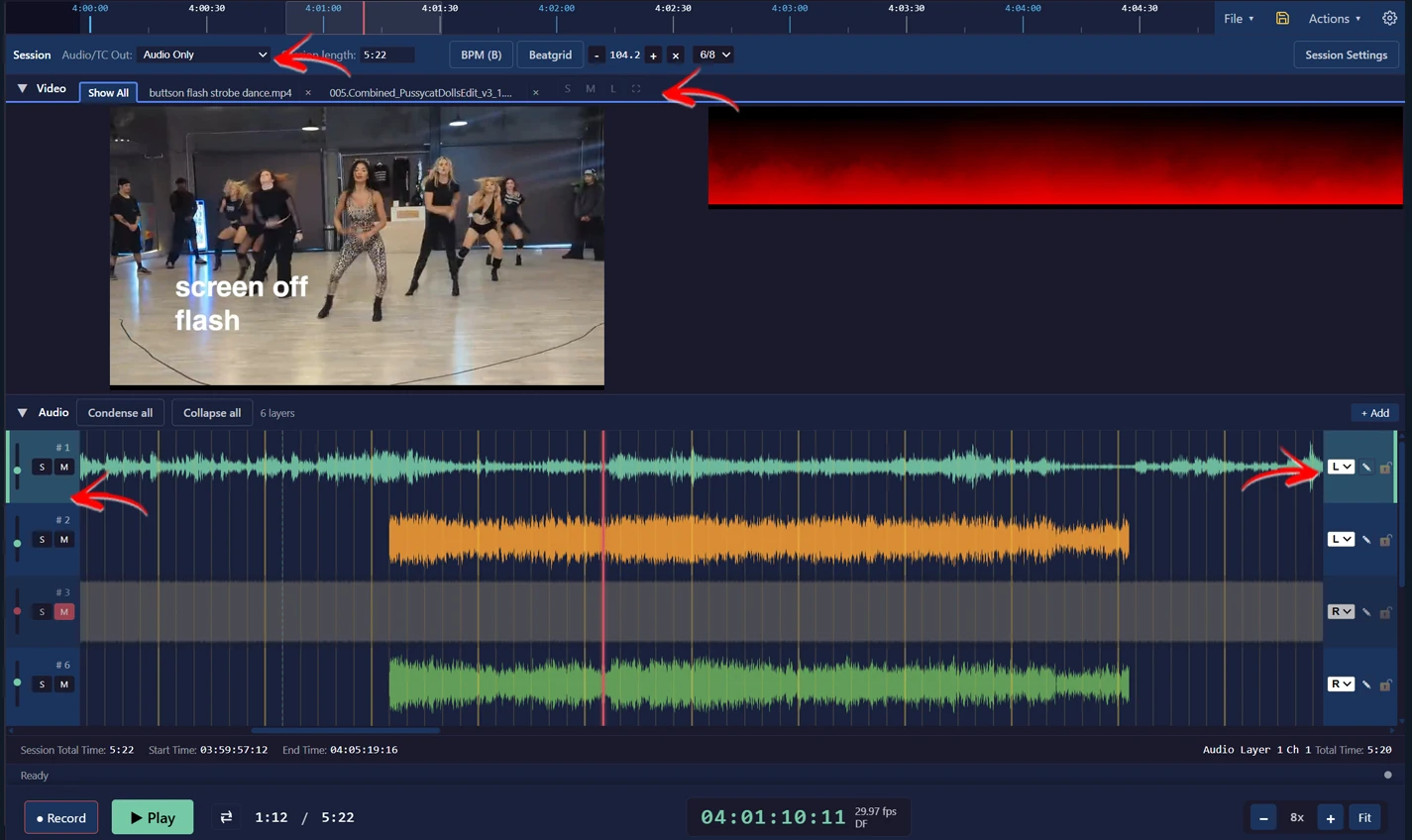
The alignment problem
The second quiet pain: standard audio editors show track time, not timecode. Open the show file in an editor and the ruler starts at zero regardless of what hour the stripe carries. So when you need to line up a second file against the first — a rehearsal recording, an alternate mix, a video with its own audio — there is nothing visual to align to. You end up guessing the preroll length and lining tracks up on faith, then checking your work by playing both and listening for phase.
This matters more than it sounds like it should, because rehearsal media multiplies. You get the striped show track, then an iPhone video of yesterday's run, then an MP3 of the new arrangement. Every one of them needs to agree about where the downbeat of hour 4 is before your programming against one of them means anything against the others.
Programming without the show-day rig
You don't need the show rig to do real timecode work. The minimum viable setup is a laptop playing the show audio out of an audio interface, with the TC channel routed to whatever the desk — a console, an onPC session, a previz rig — expects to hear it on, and the program audio routed to your ears. From there the loop is the same one you'd run on site: roll the track, watch the clock, place events, roll it again.
Practical habits that pay off:
- Confirm the stripe before you program a single event. Play the head of the file and verify the hour and rate are what the hour map says they should be. Ten seconds now versus an evening later.
- Program against the music, then tighten against the clock. Get events roughly placed in a full pass while the track plays, then go back and clean up timing. Chasing frame-accuracy on the first pass wastes the run.
- Keep one authoritative copy of each track. If your room needs different TC routings for different people, solve it at the output routing, not by multiplying files. Every extra version of the file is a future wrong-file incident.
- Log which rev you programmed against. When the artist's next pass arrives, you want to know exactly which file your event times refer to.
Where VLA fits
VLA's Media Player was built for exactly this room. It reads the timecode out of every audio file you load and drops a blue 00 line on the timeline at Timecode Hour 00 — so alignment stops being faith-based: timecoded files snap to the 00 line automatically, and non-timecoded ones (the iPhone video, the artist's MP3) align by hand against a visible reference. The Audio / TC Out picker re-routes the TC signal to whichever output channel your desk expects — TC left, TC right, TC on channel 3 or 4, or silenced entirely — independent of how the source file was laid out, so one session serves the whole room and the three-versions-of-the-file problem dies. Files with no stripe at all get a synthesized clock from the session's start hour, so a desk can chase even an unstriped rough mix. And your MA events sit on the same timeline as the waveform, which is the view rehearsal rooms never had.